Monitor Arm Desk Clamps: Check These 4 Things Before You Buy
A monitor arm lifts the screen off the desk and lets you move it closer, higher or out of the way. It has to clamp securely to your desk, match the mounting holes on your monitor and suit its weight. Use these checks before choosing one. This guide is a planning aid, not a compatibility guarantee.
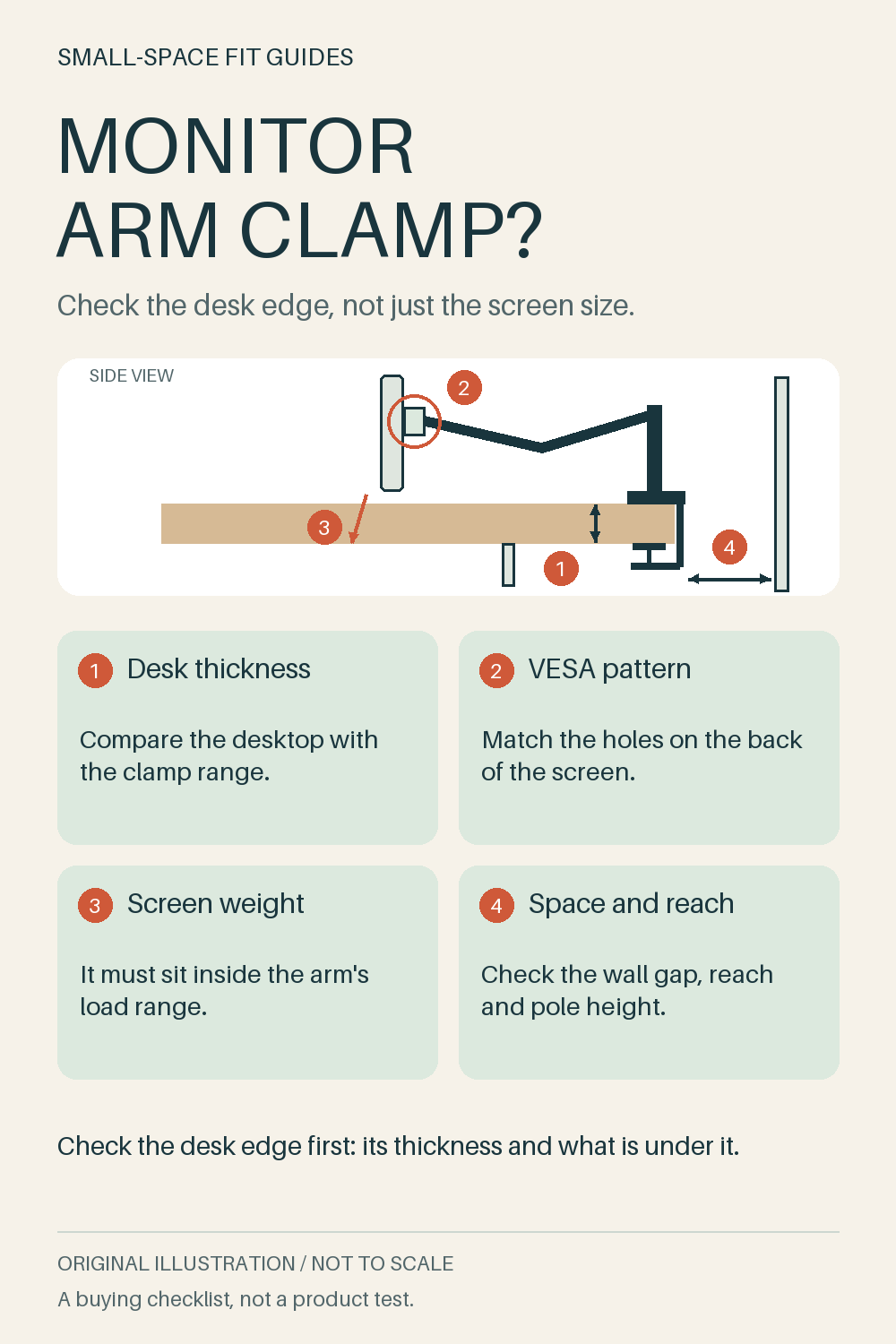
Download the original checklist image
1. Desk thickness
Measure the thickness of the desktop where the clamp will go and look underneath: a frame, drawer, cable tray or panel near the edge can stop a C-clamp from closing. Compare the thickness with the clamp range in the listing. If the listing gives different ranges in different places, rely on the smallest one or ask the seller. A grommet mount needs a hole of the listed size in the desk.
2. VESA pattern
Look for four screw holes in a square on the back of the monitor and measure between their centres; 75 x 75 mm and 100 x 100 mm are common. Check that the arm's mounting plate lists the same pattern. Curved or recessed backs may need spacers or longer screws, and a monitor without mounting holes needs an adapter.
3. Screen weight
Find the monitor's weight without its stand in its manual or specifications. Spring arms often list a minimum and a maximum load: a screen that is too light may drift up, and one that is too heavy may sag or tilt down. Check the screen size limit too, but compare the weight first. If the listing gives only a maximum, ask the seller about the minimum.
4. Space and reach
Measure the space behind the desk. The clamp, the pole and the arm's joints may need room to swing back, especially with the desk against a wall. Compare the arm's reach and height range with where you want the screen to sit, and check that the cables are long enough to follow the arm as it moves.
Before you order
Keep your desktop thickness, what is under its edge, the VESA pattern and the monitor's weight without its stand next to the arm's clamp range, grommet hole size, mounting plate and load range. After fitting, tighten the clamp, adjust the arm until the screen stays where you put it and check that nothing hits the wall. If a figure is missing, or two figures in the listing disagree, ask the seller.
Products to check against this list
The links below are affiliate links. If you buy through one, we may earn a commission at no extra cost to you. Specifications are as listed by the seller on the date shown; we have not measured, tested or approved these products for your space.
- Counterbalanced single monitor arm with clamp and grommet base. Seller-listed: Max load 10 kg (22 lb); 17-32 in screens; VESA 75/100 plate. Clamp figures differ: the drawing says 0.5-7.5 cm, a photo says 0.99-6.5 cm for the C-clamp and 0.99-5.51 cm for the grommet. No minimum load listed. Ships from Poland. (checked 2026-09-26). View on AliExpress (affiliate link)
- GTPLAYER gas-spring single monitor arm, 2-10 kg. Seller-listed: Holds 2-10 kg; 13-32 in screens; VESA 75 x 75 and 100 x 100 mm; C-clamp or grommet. Figures differ: the text says desks up to 9 cm thick and a 1.1-2.2 cm grommet hole, the images say 1-7 cm and up to 2.4 cm. Ships from Germany. (checked 2026-09-26). View on AliExpress (affiliate link)
Your fit worksheet
Use centimetres or inches consistently. These cells are intentionally unfilled: we have not measured your space or approved a product for it.
| Check | Your space or equipment | Product requirement | Status |
|---|---|---|---|
| Desk thickness | Record your measurement or observation | Confirm with the maker | Not checked |
| VESA pattern | Record your measurement or observation | Confirm with the maker | Not checked |
| Screen weight | Record your measurement or observation | Confirm with the maker | Not checked |
| Space and reach | Record your measurement or observation | Confirm with the maker | Not checked |
Reference and evidence limits
Retailer example: IKEA STUBBERGET bracket for monitor, US listing.
The linked retailer page and its public customer feedback supplied research leads, not independent performance evidence. Comments can reflect individual experiences. We have not independently reproduced them or verified compatibility, stock, price, load limits or current numerical specifications. Check the product page and instructions for your market before buying. Source reviewed on 2026-09-26.